How to use Apple Shortcuts to trigger an Axiom.ai automation
Users often inspire the best ideas, and we love to explore them. When someone asked if they could trigger a bot on their Mac using Apple Shortcuts, we thought, "why not?" We found not only can you do this, but you can also add a button to the macOS Dock for quick access. If you're a coder, you can even trigger a bot from the command line. Plus, you can trigger the bot from your iPhone, iPad, Mac or Apple Watch, making automation even more flexible.
This guide assumes you already have an automation set up, want to create a trigger using Apple Shortcuts, and have a an Axiom.ai subscription that supports webhooks.
# Getting started
To get started, you will need the following from the Axiom.ai Chrome extension:
- API key - The API key is found on the dashboard.
- Automation name - Get the name of the automation you wish to trigger.
- Endpoint - The current endpoint is
https://lar.axiom.ai/api/v3/trigger.
# Trigger an Axiom.ai automation with Apple Shortcuts
Open the Apple Shortcuts application on your iPhone, iPad, or Mac.

- Create shortcut - Tap the "+" icon to create a new Shortcut.
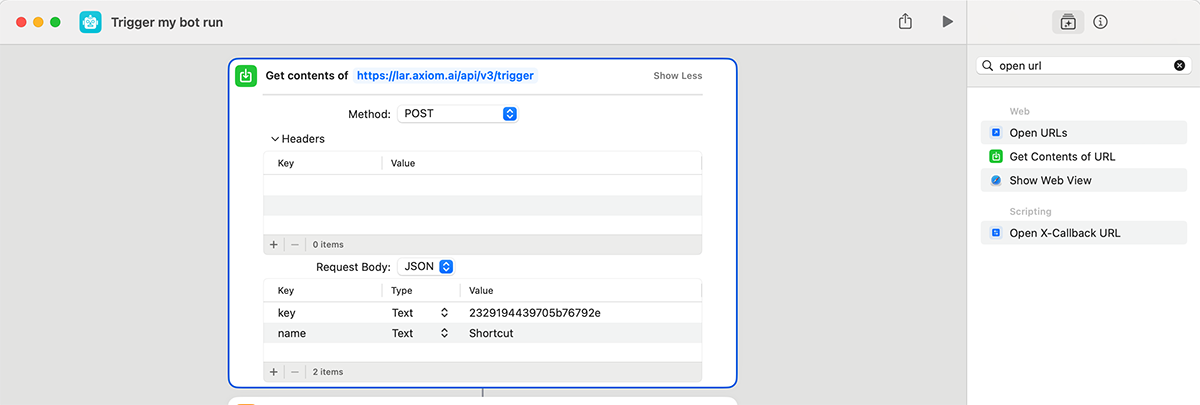
- Add step - Add a get contents from URL action, set the URL to the Axiom.ai endpoint from above.
- Configure - Change the method to POST.
- Request body - Add two key/value pairs. The first item will have a key called "key" and a value of your API key, the second will be called "name" and will be the automation name.
# Set up the Apple Shortcut to open the browser
Optionally, you can set your automation to automatically open the URL from the cloud run on your device. Add the following actions to your Apple Shortcut.
- Get dictionary value - Add a get dictionary value action below the get contents from URL action. This action converts the JSON response into a dictionary so you can work with its contents.
- Get value for key - In the "key" field, type "OPEN LINK IN BROWSER" (case sensitive).
- Open URLs - Set the value to "dictionary value".
# Trigger a bot run from your Mac dock
Your Apple Shortcut can be added to your macOS dock, allowing you easy access to your triggers with a single click.
- Open the Shortcuts app on your Mac.
- Right-click (or Control-click) on the shortcut you want to add to the Dock.
- Select Add to Dock from the context menu.

# Trigger a bot run from the command line
Apple developers have made it possible to trigger Apple Shortcuts from the command line. Open the Terminal and type the following command:
shortcuts run "My bot's name"
# Trigger bot runs with Siri
You can trigger your Shortcuts using Siri, which means you can run your bot tasks in the Axiom.ai cloud using voice commands.
The following prompt will allow you to run your Shortcut, which will trigger your Axiom.ai automation:
"Hi Siri, run shortcut" then "Name of shortcut"
# Use cases
There are a bunch of use cases that you can do with Apple Shortcuts that can make your automations even easier to run.
# Fetching an RSS feed
RSS feeds are standardised files that are presented in a computer-readable format. They are available from most news websites and allow other applications to receive updates. To get started you will need to locate the URL to the feed that you wish to retrieve, for example, https://www.reddit.com/r/axiom_ai/.rss. When you're ready, head into the Shortcuts app on your Apple device.
- Add a "Get Items from RSS Feed" step, select the number of items to retrieve and insert the URL to your feed.
- Add a "Filter Articles" step and sort it as you'd like.
You can now use this data as you wish - for example, you could use use one of the URLs to open a webpage or using the above instructions to trigger your Axiom.ai automation.
# Testing your workflow
Test the shortcut by tapping run. Apple Shortcuts will display any error messages and you should follow these for more information.
If your automation is triggered successfully but the automation has run into an error, you will find these in your run reports.
# Wrapping up
Apple Shortcuts allows for you to create powerful shortcuts that can be powered up with Axiom.ai. From triggering your automations based on your device configuration, to being able to trigger your automations from your Apple Watch, Apple Shortcuts has you covered. We'd love to hear what you use Apple Shortcuts for with your automations!
Information valid as of 29th October 2024, tested on iOS18, iPadOS18, macOS15.